
How to learn coding at home without money is one of the most important questions students, beginners, freelancers, and young people ask today. Many people believe that coding requires expensive courses, a computer science degree, a powerful laptop, or paid bootcamps. But the truth is simple: you can start learning coding from home without spending money if you follow the right path, use free resources, practice daily, and build real projects.
Many students search for how to learn coding at home because they want a skill that can help them study better, build projects, and prepare for future technology careers.
This guide is written for anyone searching for how to learn coding at home without paid courses, expensive bootcamps, or advanced computer knowledge. You do not need to be a genius, and you do not need to come from a computer science background. You only need patience, a simple learning plan, and daily practice.
Coding is now one of the most useful digital skills in the world. It is used in websites, mobile apps, software, artificial intelligence, cybersecurity, data science, cloud computing, automation, eCommerce, online businesses, and many other fields. Whether you want to become a web developer, software engineer, app developer, freelancer, or simply understand how technology works, coding can help you build a better future.
The best part is that you do not need to start with money. You need a simple computer or laptop, internet access, patience, and a learning plan. Even if you have only a basic laptop, shared computer, or limited internet, you can still begin. Many successful developers started at home with free websites, YouTube videos, documentation, online practice platforms, and small personal projects.
This complete beginner guide will explain how to learn coding at home without money, which programming language to start with, what free websites to use, how to practice, how to build projects, how to make a portfolio, and how students can move from beginner level to real career opportunities.
Table of Contents
What Is Coding?
Coding means writing instructions for a computer. These instructions tell a computer what to do, how to do it, when to do it, and what result to show. Computers do not understand human language directly, so programmers use programming languages to communicate with computers.
For example, when you open a website, click a button, submit a form, watch a video, search for something, use an app, or make an online payment, code is working behind the scenes. Developers write that code to make websites, apps, tools, and software work properly.
Coding is also called programming. A person who writes code is called a programmer, coder, developer, or software engineer depending on their role and skill level.
Some popular programming and coding languages include:
- HTML: Used to create the structure of web pages.
- CSS: Used to design and style web pages.
- JavaScript: Used to make websites interactive.
- Python: Used for general programming, automation, AI, data science, and web development.
- Java: Used for enterprise software, Android apps, and backend systems.
- C++: Used in games, system software, and performance-based applications.
- PHP: Used in web development and platforms like WordPress.
- SQL: Used to manage and work with databases.
In simple words, coding is the skill of giving clear instructions to computers so they can perform useful tasks and help solve real problems.
Before understanding how to learn coding at home, beginners should first understand that coding is not magic. It is a step-by-step way of giving instructions to computers.
How to Learn Coding at Home Without Money
The best way to understand how to learn coding at home is to start with a clear roadmap, choose one beginner-friendly language, practice every day, and build small projects step by step. Free resources are available, but they only work when you use them with discipline.
Yes, you can learn coding at home without money. Today, free learning resources are better than ever. There are free coding courses, free documentation, free video tutorials, free coding platforms, free code editors, free hosting options, and free online communities where beginners can ask questions.
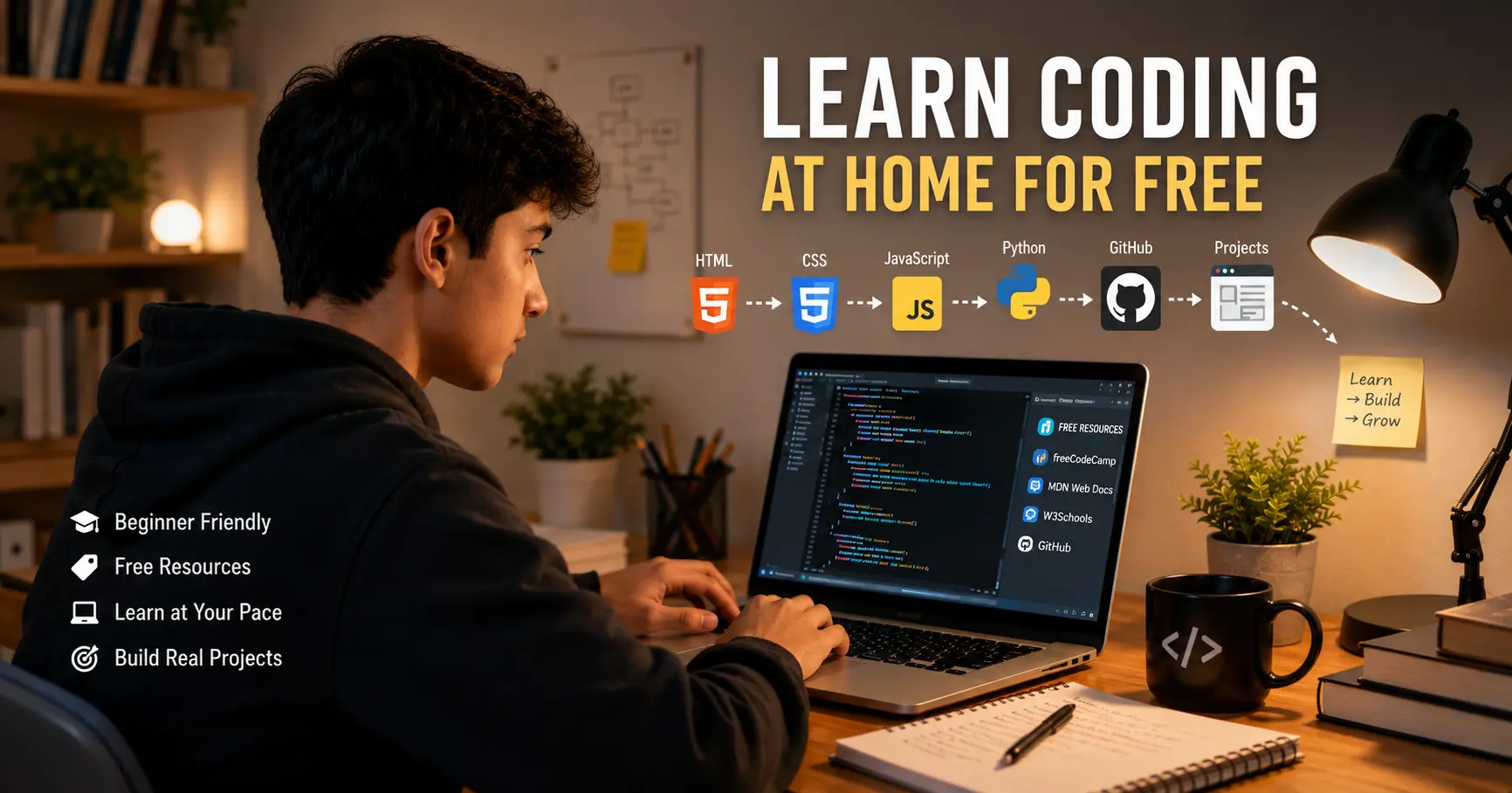
Some of the best free learning platforms include freeCodeCamp, MDN Web Docs, Harvard CS50, The Odin Project, and the official Python tutorial.
The problem for beginners is usually not the lack of free resources. The real problem is confusion. Many beginners watch too many videos, change programming languages again and again, start several courses, and never finish one complete path. To learn coding at home successfully, you need a clear roadmap.
If you follow one learning path, practice daily, build small projects, and avoid distractions, you can learn coding without paid courses.
Why Learning Coding Is Important for Students
Students should learn coding because the world is becoming more digital every year. Education, business, banking, health, transport, communication, shopping, entertainment, and government services are all using software and online systems. Coding helps students understand how these systems work.
For students, how to learn coding at home is not only about learning a programming language. It is also about building confidence, improving logic, and creating useful digital skills.
Learning coding does not mean every student must become a professional software developer. Even if a student chooses another career, coding improves logical thinking, problem-solving, creativity, and confidence with technology.
Here are some major benefits of learning coding:
- Coding improves problem-solving skills.
- It helps students understand websites, apps, and software.
- It creates freelancing and remote work opportunities.
- It builds confidence in modern technology.
- It helps students create their own websites, apps, and tools.
- It supports future careers in AI, cybersecurity, cloud computing, and data science.
- It teaches patience, logic, and step-by-step thinking.
If you want to understand related technology fields, you can also read our beginner guides on web development, generative AI, and cybersecurity.
Step 1: Understand How to Learn Coding at Home With a Clear Goal
When beginners ask how to learn coding at home, the first answer is not “choose any language.” The first answer is to understand your goal. Your goal will help you choose the right language, the right learning platform, and the right project type.
Before learning coding, ask yourself one simple question: why do I want to learn coding?
Your answer will help you choose the right language and roadmap. Many beginners fail because they start randomly. One day they learn Python, the next day JavaScript, then C++, then app development, and after a few weeks they feel lost.
Here are some common goals and the best starting paths:
- I want to build websites: Start with HTML, CSS, and JavaScript.
- I want to learn general programming: Start with Python.
- I want to learn artificial intelligence: Start with Python and basic mathematics.
- I want to become a freelancer: Start with web development.
- I want to build mobile apps: Start with programming basics, then learn Flutter, Kotlin, Swift, or React Native.
- I want to understand computer science: Start with Harvard CS50 or programming fundamentals.
- I want to work in cybersecurity: Learn networking, Linux, Python, and security basics.
For most students and beginners, the best starting point is either web development or Python. Web development gives fast visual results. Python is easy to read and useful for many areas.
Step 2: Choose the Best Coding Language for Beginners
Choosing the first programming language is important, but beginners should not overthink it. The goal is not to choose the “perfect” language. The goal is to start learning logic, syntax, and problem-solving.
The best answer to how to learn coding at home depends on your goal. Website learners should start with HTML, CSS, and JavaScript, while general programming learners can start with Python.
HTML, CSS, and JavaScript for Web Development
If you want to make websites, start with HTML, CSS, and JavaScript. These are the main building blocks of the web.
HTML is used to create the structure of a web page. It adds headings, paragraphs, images, links, forms, and sections.
CSS is used to make a website beautiful. It controls colors, fonts, spacing, layouts, backgrounds, and mobile responsiveness.
JavaScript is used to make websites interactive. It controls buttons, menus, sliders, popups, form validation, calculators, and dynamic content.
This is the best path for beginners who want to see results quickly. You can create your first simple web page within one day and keep improving it.
Python for General Programming
Python is one of the easiest programming languages for beginners because its syntax is simple and readable. It is used in automation, data science, artificial intelligence, machine learning, backend development, scripting, and education.
Python is a good choice if you want to understand programming logic before going into a specific field. Many schools and universities also use Python for beginner programming.
Java and C++ for Deeper Programming
Java and C++ are powerful languages, but they are usually harder for complete beginners. Java is used in enterprise software, Android development, and backend systems. C++ is used in game development, performance-based applications, system software, and competitive programming.
If you are learning at home without a teacher, start with Python or web development first. Later, you can learn Java, C++, PHP, or other languages based on your goals.
Step 3: Set Up Free Coding Tools
You do not need expensive software to start coding. Most professional coding tools are free. A beginner can start with simple tools and upgrade later when needed.
You do not need paid software to understand how to learn coding at home. Most beginner coding tools are free and work well on a normal computer.
Here are the basic tools you need:
- Computer or laptop: Any normal computer is enough for beginner coding.
- Internet connection: Useful for courses, documentation, and solving errors.
- Code editor: Use Visual Studio Code, which is free and popular.
- Browser: Use Chrome, Firefox, or Edge for testing websites.
- Git: Used to track changes in your code.
- GitHub: Used to save and share coding projects online.
- Online editors: Use Replit, CodePen, JSFiddle, or GitHub Codespaces if you cannot install tools.
If you are learning web development, you can begin with just a browser and a code editor. If you are learning Python, you can install Python or use an online Python editor.
Step 4: Learn Basic Computer and Internet Concepts
Before writing advanced code, it is helpful to understand basic computer and internet concepts. You do not need to become a networking expert, but basic knowledge makes learning easier.
Learn these beginner concepts:
- What is a file and folder?
- What is a browser?
- What is a website?
- What is a server?
- What is a domain name?
- What is hosting?
- What is the internet?
- What is a database?
- What is an API?
For example, when you open a website, your browser requests files from a server. The server sends HTML, CSS, JavaScript, images, and other files back to your browser. The browser then displays the website on your screen.
If you want to understand how networks work, you can also read our article on the OSI Model. It explains networking layers in a beginner-friendly way.
Step 5: Learn Programming Basics Properly
Every beginner should focus on programming basics. These basics are used in almost every coding language. If your foundation is strong, learning advanced topics becomes easier.
A strong foundation is the most important part of how to learn coding at home. If you understand variables, loops, conditions, and functions, advanced topics become easier later.
Important programming basics include:
- Variables: Used to store information.
- Data types: Different kinds of data such as text, numbers, and true/false values.
- Operators: Used for calculations and comparisons.
- Conditions: Used to make decisions in code.
- Loops: Used to repeat tasks.
- Functions: Used to organize reusable code.
- Arrays or lists: Used to store multiple values.
- Objects: Used to group related data and behavior.
- Input and output: Used to receive and display information.
- Debugging: Used to find and fix errors.
These ideas may look simple, but they are the foundation of real software development. A calculator, website form, login system, game, app, or automation script all use these basic concepts.
Step 6: Follow a Free Coding Roadmap at Home
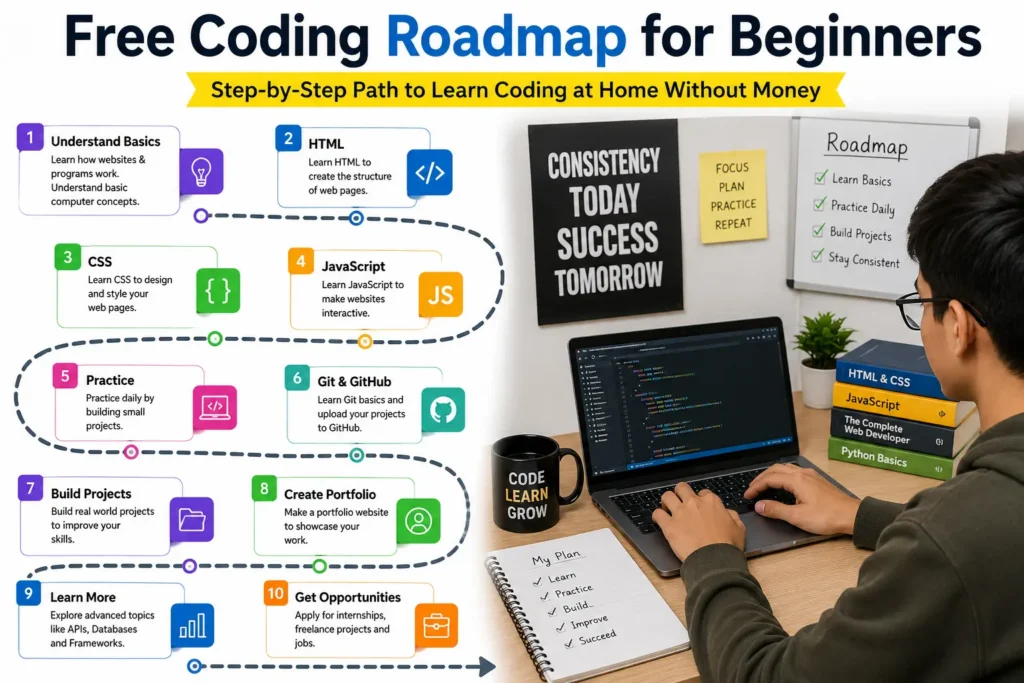
If you are serious about how to learn coding at home, do not jump from one tutorial to another. Follow one roadmap and complete it patiently. A roadmap keeps your learning organized and saves you from confusion.
Without a roadmap, you may waste time jumping between different topics. Below are two simple roadmaps: one for web development and one for Python.
Free Web Development Roadmap for Beginners
For web development students, how to learn coding at home starts with HTML, then CSS, then JavaScript, and finally real projects.
- Learn how websites and browsers work.
- Learn HTML basics.
- Learn CSS basics.
- Build simple static web pages.
- Learn mobile responsive design.
- Learn JavaScript basics.
- Build interactive JavaScript projects.
- Learn Git and GitHub.
- Learn basic hosting using GitHub Pages, Netlify, or Vercel.
- Create a portfolio website.
- Learn basic backend concepts.
- Learn APIs and databases later.
Free Python Roadmap for Beginners
For Python beginners, how to learn coding at home starts with simple syntax, small programs, problem-solving practice, and beginner-friendly projects.
- Install Python or use an online Python editor.
- Learn Python syntax.
- Understand variables and data types.
- Practice conditions and loops.
- Learn functions.
- Work with lists and dictionaries.
- Learn file handling.
- Build small Python projects.
- Practice problem-solving.
- Learn automation basics.
- Explore data science, AI, or web development later.
Do not rush the roadmap. Learning coding is not a one-week task. It is a skill that improves with practice.
Step 7: Use Free Learning Websites
Free resources are powerful, but they work only when you use them with discipline. Learning how to learn coding at home means choosing the right free platforms and practicing instead of only watching videos.
Free learning websites make how to learn coding at home easier to understand because beginners can study step by step without paying for courses.
There are many free coding websites, but you should not try to use all of them at the same time. Choose one main platform and use other resources only for support.
1. freeCodeCamp
freeCodeCamp is one of the best free platforms for beginners. It offers coding lessons, practice exercises, projects, and certifications. It is especially useful for web development, JavaScript, Python, data visualization, backend development, and more.
2. MDN Web Docs
MDN Web Docs is one of the most trusted resources for learning web development. It is useful for HTML, CSS, JavaScript, browser APIs, and front-end development.
3. Harvard CS50
Harvard CS50 is a famous introductory computer science course. It is useful for students who want to understand programming, algorithms, computer science thinking, and problem-solving.
4. The Odin Project
The Odin Project is a free full-stack web development curriculum. It is project-based and helps beginners learn real web development step by step.
5. Python Official Tutorial
The Python official tutorial is useful for learning Python directly from official documentation. Beginners can use it after learning basic Python from videos or beginner courses.
Step 8: Practice Coding at Home Every Day
Coding is not learned by only watching videos. It is learned by writing code. A beginner should write code daily, even if the code is simple. This is one of the most important rules for anyone learning from home.
The real secret of how to learn coding at home is daily practice. Even one hour every day is better than five hours once a week.
For example, if you watch a video about HTML forms, create your own form after the video. If you learn CSS colors and spacing, design your own simple page. If you learn JavaScript conditions, build a small age checker or grade calculator. If you learn Python loops, create a multiplication table or number guessing game.
Do not copy code without thinking. Type it yourself, change it, break it, fix it, and understand what each line does.
Simple Daily Coding Routine
- 20 minutes: Watch or read one small lesson.
- 40 minutes: Write code based on that lesson.
- 20 minutes: Change the code and test different results.
- 20 minutes: Fix errors and write notes.
This daily routine can help beginners make steady progress without feeling overloaded.
Step 9: Build Small Coding Projects
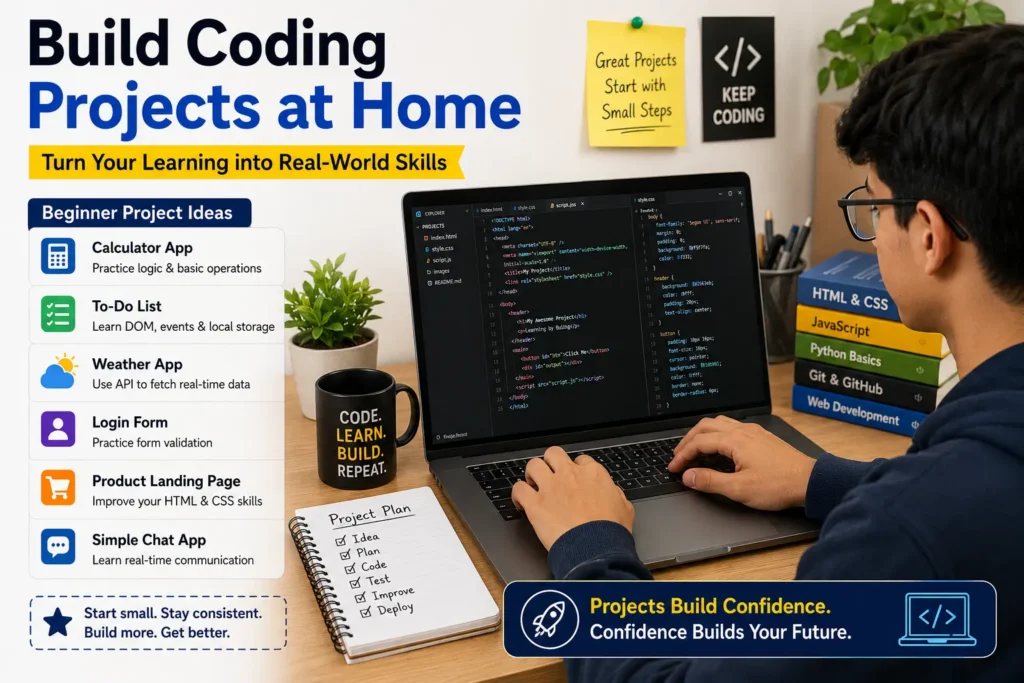
Projects are the most important part of learning coding. A project proves that you can use your knowledge to create something useful. Projects also help you build confidence and prepare for freelancing, internships, or jobs.
Projects are the real proof that you understand how to learn coding at home. Without projects, learning remains only theory. A beginner who builds five small projects usually learns more than a beginner who only watches twenty tutorials.
If someone asks how to learn coding at home faster, the answer is simple: build projects, test your code, fix errors, and repeat the process.
Beginners should start with small projects. Do not try to build a big app in the first month. Start simple and improve slowly.
Beginner HTML and CSS Project Ideas
- Personal profile page
- Student portfolio page
- Restaurant menu page
- Product landing page
- Simple blog homepage
- Travel page design
- School website homepage
- Responsive contact form
- Pricing table design
- Simple resume website
Beginner JavaScript Project Ideas
- Calculator
- Digital clock
- To-do list
- Quiz app
- Age calculator
- Tip calculator
- Image slider
- Weather app using API
- Form validation
- Currency converter
Beginner Python Project Ideas
- Number guessing game
- Simple calculator
- Password generator
- Student marks calculator
- Expense tracker
- Text converter
- File organizer
- Simple chatbot
- Quiz program
- Basic automation script
After completing a project by following a tutorial, try to build it again without watching the tutorial. This is how you test your real understanding.
Step 10: Learn How to Fix Coding Errors
Errors are normal in coding. Every beginner faces errors, and even professional developers face errors every day. Do not think that errors mean you are not good enough. Errors are part of the learning process.
When your code does not work, follow these steps:
- Read the error message carefully.
- Check the line number mentioned in the error.
- Look for spelling mistakes.
- Check brackets, commas, quotation marks, and semicolons.
- Compare your code with a working example.
- Search the exact error message online.
- Break your code into smaller parts and test again.
- Ask for help in a coding community if needed.
Debugging is a real developer skill. The more errors you solve, the stronger you become.
Step 11: Learn Git and GitHub
Another important part of how to learn coding at home is saving your work properly. Git and GitHub help beginners store projects, track progress, and show their skills.
GitHub also supports how to learn coding at home because it gives beginners a free place to save projects and show their progress.
Git and GitHub are important tools for developers. Git helps you track changes in your code. GitHub helps you store and share your projects online.
Beginners should learn Git and GitHub after completing a few basic projects. You do not need to master everything in the beginning. Start with basic commands and use GitHub to save your work.
Basic Git commands include:
git initgit statusgit add .git commit -m "first commit"git pushgit pull
GitHub is also useful for building a portfolio. When you apply for freelance work, internships, or jobs, your GitHub profile can show your projects and progress.
Step 12: Create a Free Coding Portfolio
A portfolio is a website that shows your skills, projects, and contact details. Every beginner should create a portfolio after building a few projects.
Your portfolio should include:
- Your name
- A short introduction
- Your coding skills
- Your projects
- Project screenshots
- GitHub links
- Live website links
- Contact information
You can host your portfolio for free using GitHub Pages, Netlify, or Vercel. A portfolio makes you look serious and professional. It also gives you confidence because you can see your progress in one place.
Step 13: Practice Problem-Solving
Coding is not only about writing syntax. It is about solving problems. Beginners should practice small logical problems regularly.
Examples of beginner problems include:
- Find the largest number in a list.
- Check if a number is even or odd.
- Create a multiplication table.
- Reverse a word.
- Count vowels in a sentence.
- Calculate student grades.
- Create a simple login check.
- Sort a list of numbers.
Problem-solving improves your thinking. You do not need to solve very difficult problems in the beginning. Start with easy problems and slowly increase difficulty.
Step 14: Join Free Coding Communities
Learning coding at home can feel lonely. A community can help you stay motivated, ask questions, and learn from others.
You can join free communities on:
- freeCodeCamp forum
- Stack Overflow
- GitHub
- Reddit programming communities
- Discord coding servers
- Facebook programming groups
- LinkedIn developer groups
When asking for help, explain your problem clearly. Share your code, error message, and what you already tried. This helps others understand your issue and guide you better.
Step 15: Avoid Tutorial Hell
Tutorial hell means watching tutorials again and again without building your own projects. Many beginners feel they are learning, but when they try to create something without a video, they get stuck.
To avoid tutorial hell, follow this rule:
- Watch one tutorial.
- Build the same project with the tutorial.
- Build it again without the tutorial.
- Change the design and features.
- Create your own similar project.
This process turns passive watching into active learning. You do not become a coder by only watching someone else code. You become a coder by writing and fixing your own code.
Step 16: Learn Basic English for Coding
Many programming languages and documentation use English words. You do not need perfect English to learn coding, but basic English can help you read error messages, documentation, and tutorials.
Learn common coding words such as:
- Variable
- Function
- Return
- Loop
- Array
- Object
- Class
- Error
- Debug
- Install
- Run
- Build
As you practice coding, your technical English will improve naturally.
Step 17: Learn Responsive Web Design
If you choose web development, responsive design is very important. Responsive design means your website looks good on desktop, tablet, and mobile screens.
Today, many users browse websites from mobile phones. A website that looks good only on desktop is not enough. You should learn CSS media queries, flexible layouts, responsive images, and mobile-first design.
Responsive design is also important for SEO because search engines and users prefer websites that work well on mobile devices.
Step 18: Understand Backend and Databases Later
After learning HTML, CSS, and JavaScript, beginners can slowly move toward backend development. Backend development handles server-side logic, databases, authentication, APIs, and data processing.
Common backend technologies include:
- Node.js
- Express.js
- PHP
- Python Django
- Python Flask
- Java Spring
- SQL databases
- MongoDB
Do not start backend too early if your front-end basics are weak. First understand web pages, layouts, JavaScript basics, and projects. Then move forward.
Step 19: Learn Cybersecurity Basics
Every developer should understand basic cybersecurity. When you build websites or apps, you must think about user data, passwords, forms, and safe coding practices.
Beginners should learn about:
- Strong passwords
- HTTPS
- Input validation
- SQL injection basics
- Cross-site scripting basics
- Safe login systems
- Data privacy
- Software updates
Cybersecurity is a large field, but basic awareness is useful for every programmer. You can read our detailed beginner guide on what cybersecurity is and why it is important.
Step 20: Learn AI and Automation After Basics
Artificial intelligence and automation are becoming very popular. Many students want to learn AI immediately, but it is better to learn programming basics first.
If you are interested in AI, start with Python, basic mathematics, data handling, and simple machine learning concepts. Later, you can explore AI tools, machine learning libraries, and real projects.
You can also read our article on generative AI to understand how modern AI tools create text, images, code, and other digital content.
How Long Does It Take to Learn Coding at Home?
The time depends on your goal, daily practice, and consistency. If you practice one to two hours daily, you can understand basic coding in two to three months. You can build beginner projects in three to six months. Becoming job-ready may take six months to one year or more.
Here is a realistic timeline:
- First month: Learn basic syntax and write simple code.
- Second month: Build small beginner projects.
- Third month: Learn Git, GitHub, and improve your projects.
- Four to six months: Build a portfolio and intermediate projects.
- Six to twelve months: Prepare for freelancing, internships, or junior developer roles.
Some people learn faster and some learn slower. Do not compare your speed with others. Focus on daily improvement.
Can You Get a Job After Learning Coding at Home?
Yes, you can get a job after learning coding at home, but you must build real skills. Watching videos and collecting certificates is not enough. Employers and clients want to see what you can build.
To improve your chances, focus on:
- Strong basics
- Real projects
- GitHub profile
- Portfolio website
- Problem-solving skills
- Communication skills
- Consistency
Beginners can start with small freelance work, internships, personal projects, local business websites, landing pages, bug fixes, or simple automation tools.
Can You Learn Coding on a Mobile Phone?
Yes, you can start learning coding on a mobile phone, especially if you do not have a computer. You can watch tutorials, read documentation, take notes, and use online coding apps. However, for serious coding, a laptop or desktop computer is better.
If you only have a mobile phone, start with basic concepts and small examples. Later, try to use a school computer, library computer, office computer, shared laptop, or low-cost used laptop for better practice.
Do You Need Mathematics to Learn Coding?
You do not need advanced mathematics to start coding. Basic math is enough for web development and beginner programming. You should understand simple calculations, percentages, comparisons, and logic.
Advanced mathematics becomes more important if you want to go into artificial intelligence, machine learning, data science, game development, graphics, or algorithms. But beginners should not delay learning coding because of math fear.
Best Free Study Plan for 30 Days
This 30-day plan is designed for students who want a simple answer to how to learn coding at home without confusion. It will not make you an expert in one month, but it will help you start with a clear direction.
This plan gives beginners a practical answer to how to learn coding at home by dividing the learning process into small daily actions.
Days 1 to 5: Understand Basics
- Learn what coding is.
- Choose your path: web development or Python.
- Set up your code editor.
- Write your first code.
- Understand files, folders, and browser basics.
Days 6 to 10: Learn Core Concepts
- Learn variables and data types.
- Practice conditions.
- Practice loops.
- Understand functions.
- Create small examples daily.
Days 11 to 15: Build Small Projects
- Create a calculator.
- Create a profile page.
- Create a simple form.
- Create a quiz or number game.
- Fix errors yourself.
Days 16 to 20: Improve Your Skills
- Learn responsive design if you are doing web development.
- Learn lists and dictionaries if you are doing Python.
- Practice more examples.
- Read documentation.
- Start using GitHub.
Days 21 to 25: Build Better Projects
- Create a to-do list.
- Create a portfolio homepage.
- Create a landing page.
- Create a password generator.
- Upload projects to GitHub.
Days 26 to 30: Review and Publish
- Review everything you learned.
- Fix project errors.
- Improve design and code quality.
- Publish one project online.
- Plan your next 30 days.
Common Mistakes Beginners Should Avoid
Beginners often make mistakes that slow down their progress. Avoid these common problems:
One common problem in how to learn coding at home is changing languages too quickly. Beginners should stay with one path long enough to build confidence.
- Changing programming languages too often.
- Watching tutorials without practice.
- Trying advanced projects too early.
- Copying code without understanding it.
- Ignoring errors instead of solving them.
- Not building projects.
- Not using GitHub.
- Comparing yourself with experienced developers.
- Learning without a roadmap.
- Quitting after a few difficult days.
Coding becomes easier when you accept that confusion is part of learning. Every developer was once a beginner.
Best Career Options After Learning Coding
After learning coding, students can explore many career paths. Some popular options include:
- Front-end developer
- Back-end developer
- Full-stack developer
- Python developer
- Mobile app developer
- WordPress developer
- Software engineer
- Data analyst
- AI beginner developer
- Cybersecurity beginner
- Automation developer
- Freelance web developer
You do not need to choose everything at once. Start with one path, build skills, and then decide your direction.
How Parents Can Support Students Learning Coding
Parents do not need to be programmers to support students. They can help by giving time, encouragement, and a peaceful learning environment.
Parents can support students by:
- Allowing regular practice time.
- Encouraging small projects.
- Not expecting instant income.
- Helping students avoid distractions.
- Appreciating progress.
- Providing internet access if possible.
- Encouraging safe online learning.
Coding is a long-term skill. Students need patience and support to grow.
In the end, how to learn coding at home is about consistency, not money. Free resources are enough when you use them with discipline and regular practice.
Final Thoughts
How to learn coding at home without money is not only possible, but also one of the smartest ways for students and beginners to enter the digital world. You do not need expensive courses in the beginning. You need a clear goal, a simple roadmap, free resources, daily practice, and real projects.
The journey of how to learn coding at home becomes easier when you focus on one path, practice daily, build projects, and keep improving slowly. Do not try to learn everything at once. Learn one topic, practice it, build something, and then move to the next step.
If you want to build websites, start with HTML, CSS, and JavaScript. If you want general programming, automation, AI, or data science, start with Python. Use free platforms like freeCodeCamp, MDN Web Docs, Harvard CS50, The Odin Project, and official documentation. Practice every day, build small projects, learn GitHub, create a portfolio, and keep improving.
Coding is not learned in one night. It takes time, mistakes, patience, and practice. But every small step matters. If you start today and stay consistent, you can build real skills from home without spending money.
For students, beginners, and future professionals, coding is more than a technical skill. It is a way to think, solve problems, create digital products, and participate in the future of technology.
FAQs About How to Learn Coding at Home
1. Can I learn coding at home without money?
Yes, you can learn coding at home without money by using free websites, free tutorials, free documentation, free code editors, and regular practice.
2. What is the best language to start coding?
For web development, start with HTML, CSS, and JavaScript. For general programming, automation, AI, or data science, Python is a good beginner-friendly choice.
3. How many hours should I practice coding daily?
Beginners can start with one to two hours daily. Consistency is more important than studying many hours once a week.
4. Can I get a job after learning coding at home?
Yes, but you need real projects, a portfolio, GitHub profile, problem-solving skills, and regular practice. Certificates alone are not enough.
5. Is coding difficult for beginners?
Coding can feel difficult at the start, but it becomes easier with practice. Start with small topics, write code daily, and build simple projects.
6. Do I need a degree to become a programmer?
A degree can help, but it is not the only path. Many developers learn through free resources, projects, portfolios, and practical experience.
7. Can I learn coding on a mobile phone?
You can start learning coding on a mobile phone, but a laptop or desktop computer is better for serious practice and real projects.
8. What are the best free websites to learn coding?
freeCodeCamp, MDN Web Docs, Harvard CS50, The Odin Project, and Python official documentation are excellent free resources for beginners.
9. Should I learn Python or web development first?
If you want to create websites, start with web development. If you want general programming, automation, AI, or data science, start with Python.
10. What is the biggest mistake beginners make?
The biggest mistake is watching too many tutorials without writing code. Coding is learned by practice, projects, and solving errors.
11. How long does it take to learn coding?
Basic coding can be learned in two to three months with daily practice. Becoming job-ready may take six months to one year or more.
12. Can students learn coding without a teacher?
Yes, students can learn coding without a teacher by following a roadmap, using free resources, building projects, and joining online coding communities.
13. What is the easiest way to learn coding at home?
The easiest way to learn coding at home is to choose one beginner path, follow free resources, practice daily, build small projects, and avoid changing languages too often.